








AI-Powered eDiscovery & Information Governance Software

For Legal, Corporate, Government & Defense Teams

Since 2006, Rational Enterprise has provided software and support for law firms, businesses, government agencies, military contractors, healthcare organizations, schools, universities, and insurers. Use Rational Review to review and produce evidence. Use Rational Governance to find sensitive information and manage records where they are stored.

20+ Years Experience
2000+ Matters Completed
Our Solutions

Software for eDiscovery Review and Information Governance

Use Rational Governance to classify records, apply retention policies, and preserve data. Use Rational Review for early case assessment, document review, and production.

Rational Review arrow
Rational Review
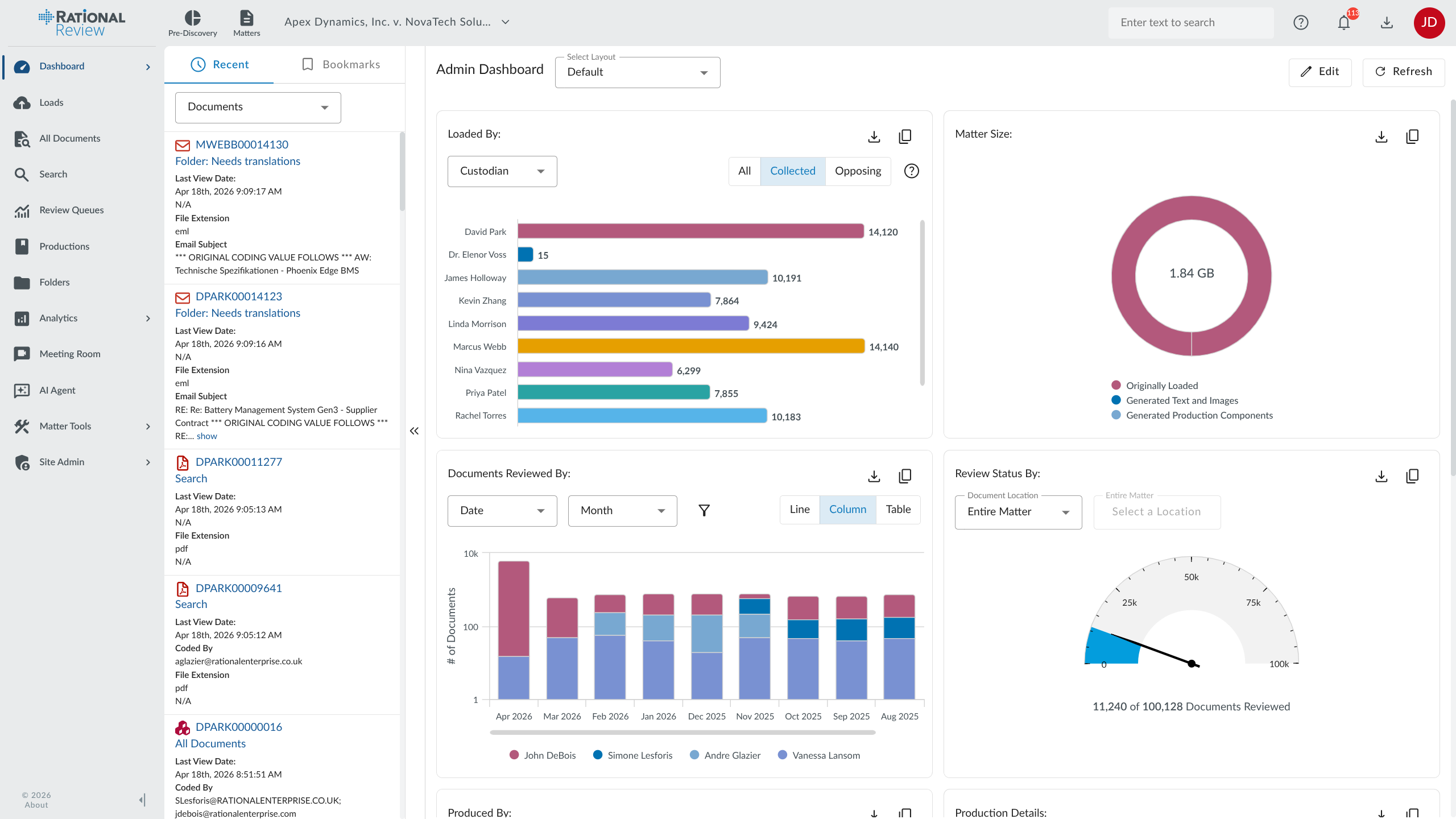
Rational Review platform screenshot

Review documents, investigate facts, and prepare productions in a cloud eDiscovery platform. Predictive coding, email threading, and AI review tools help your team decide what needs attention. A dedicated client services team helps manage the matter.

  • Litigation review & production
  • Technology-assisted review (TAR)
  • Early case assessment (ECA)
  • Legal hold management
  • Internal investigations
  • M&A deal room
Learn About Rational Review
Rational Governance arrow
Rational Governance
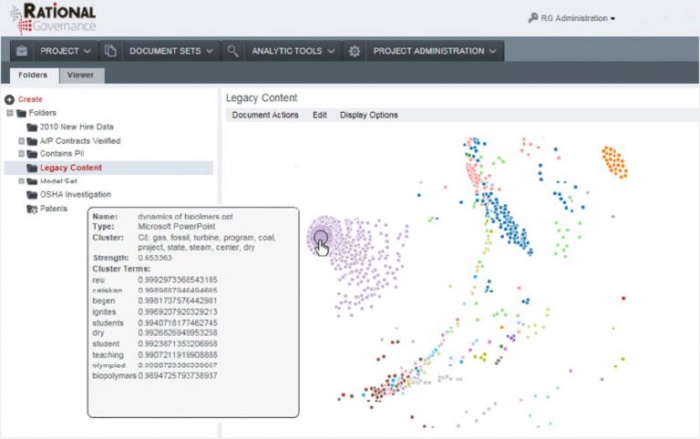
Rational Governance platform screenshot

Find out what is in your file shares, email archives, and cloud storage. Classify sensitive information, apply retention policies, and identify records eligible for disposal. Manage data in place so governance does not require a separate copy of every file.

  • Automated data classification
  • Data retention & disposition
  • Dark data & ROT remediation
  • GRC & compliance management
  • Information security governance
  • Storage optimization
Learn About Rational Governance

Some of the Organizations We Work With

client logo
client logo
client logo
client logo
Why Rational Enterprise

Find the Records You Need. Account for the Ones You Keep.

A discovery request can mean searching years of email, messages, and shared files. Retention work starts with knowing what those repositories contain. Our software gives legal, records, and compliance teams tools for both.

Growing ESI Volumes

A single matter can involve email, Teams messages, shared files, and phone data. Process those sources in Rational Review, then filter by date, custodian, and relevance before full document review.

Rising Litigation Costs

Use email threading, near-duplicate detection, and technology-assisted review to avoid reviewing the same material repeatedly. The time saved depends on your collection and review protocol.

Defensibility & Spoliation Risk

Know what was preserved, how it was handled, and who reviewed it. Keep an audit trail of discovery work so your team can explain its process when questioned.

Dark Data

Old file shares and email archives can hold sensitive records that no one has cataloged. Rational Governance indexes and classifies that content so you can search it and decide how it should be managed.

Regulatory Fine Exposure

Apply retention policies consistently across repositories. Rational Governance records disposition activity so records and compliance teams can show what was deleted and why.

ROT Data Overretention

Duplicate files and records past their retention period add storage and review work. Identify redundant, obsolete, or trivial (ROT) data and route eligible records through a documented disposal process.

AI-Powered eDiscovery

Use AI to Sort Documents and Check Relevance

Reduce manual document review with AI-assisted relevance decisions, predictive coding, and document summaries.

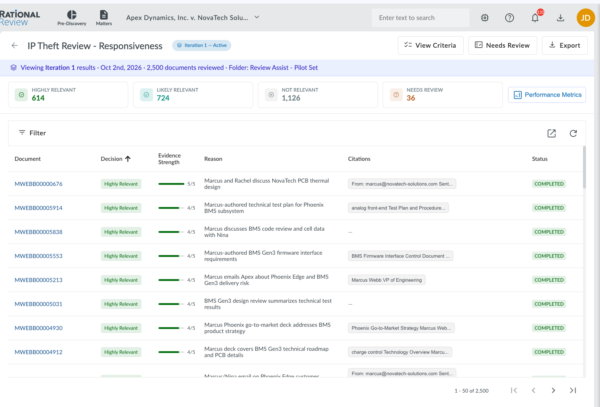
AI Review Assist makes a first-pass responsiveness decision for each document and explains its reasoning. Low-confidence decisions and disagreements with earlier coding go to a Needs Human Review queue for your team to assess.

TAR 2.0 Continuous active learning
AI First-pass responsiveness review
28+ Languages detected & translated

AI Review Assist

Define what is relevant to the matter. Each document receives a responsiveness decision, confidence score, and explanation. Review uncertain calls and disagreements with earlier coding in the Needs Human Review queue.

AI Document Chatbot

Ask questions about a document or the matter in plain language. Follow up in the same conversation to investigate a point without building a new search query each time.

Bulk AI Summarization

Generate summaries for a batch of documents. Use them to identify key facts and select files for closer reading.

Sentiment Analysis

Score communications as positive, negative, or neutral. Use the scores as another way to sort material during employment, fraud, or regulatory investigations.

Predictive Coding (TAR)

Rank unreviewed documents using relevance decisions your reviewers have already made. TAR 2.0 updates those predictions as review continues. Validate the results against your review protocol.

Concept Clustering

Group documents by subject to see the topics in a collection. Examine related files together and identify themes worth investigating.

PII & Privilege Detection

Flag patterns such as Social Security numbers and phone numbers, along with possible privilege indicators such as attorney domains. Review the flagged content before making redaction or disclosure decisions.

Bulk Translation (28+ Languages)

Translate document batches into English and search the translated text. Support for 28+ languages helps teams work through multilingual collections.

Supported Data Sources

Review the Email, Messages, and Files in Your Matter

Work with electronically stored information (ESI) from business systems, collaboration tools, and mobile devices. Rational Review keeps searchable content and source metadata available during review.

Email & Attachments

Review email threads with attachments kept in their document families. Compare custodians and date ranges, and identify inclusive emails to limit repeat review.

Microsoft Teams & Slack

Review channel messages, direct messages, and attachments in a conversation viewer that keeps the surrounding discussion in view.

SMS & WhatsApp

Import text messages and WhatsApp conversations. Divide threads into review units while preserving their metadata.

Native Documents

Review Word, Excel, PowerPoint, and PDF files. Apply redactions to text and images, including shapes and charts in spreadsheets.

Password-Protected Files

Apply detected passwords during loading to process protected Office files and encrypted archives.

Audio & Video Transcription

Transcribe recordings into searchable text. Review and redact the transcripts, then produce them alongside the source recordings.

Spreadsheets & Databases

Search extracted spreadsheet text and review cell content. Redact sensitive cells, shapes, and charts before production.

Multilingual Documents

Detect document languages, translate batches of files, and search the translated text during cross-border discovery and investigations.

Rational Review platform
eDiscovery Platform
Rational Review

Load your collection, assess the evidence, and organize documents for review. Use predictive coding, redaction tools, and production workflows in the same eDiscovery platform, with a client services team available throughout the matter.

Learn About Rational Review

eDiscovery Use Cases

Walk Through Your eDiscovery or Governance Workflow

Tell us about your data sources, deadlines, and review or retention needs. We can show you the relevant tools and discuss services, deployment, and pricing.

FAQ

Frequently Asked Questions

About eDiscovery & Information Governance Software