Information Governance Software for Records Management
Classify records, apply retention policies, and manage legal holds.
Rational Governance helps law firms, corporations, government agencies, and military contractors manage records across file shares, email, and cloud repositories. Use classification to identify sensitive information, apply retention policies, and preserve records under legal hold where they are stored.
Know What Is in Your Repositories and How Long to Keep It
Index content and metadata from connected repositories to see what your organization holds. Find sensitive records, classify documents, and apply retention policies from one interface. Keep the source files in place while legal, records, and IT teams work from the same index.
"We have been impressed with the high level of service and professionalism from Rational. The service team has been incredibly responsive, adaptable, and accommodating to our specific requirements."

"Rational Enterprise has provided us with an end-to-end solution that handles in-place data management combined with effective and efficient eDiscovery response which has significantly reduced our eDiscovery spend."


Assess Your Records Retention and Data Storage Practices
Answer a short set of questions about your stored data and retention practices. The assessment provides a risk score and a report to help you decide which repositories and policies to examine first.
Start My Free AssessmentKey Features of Rational Governance
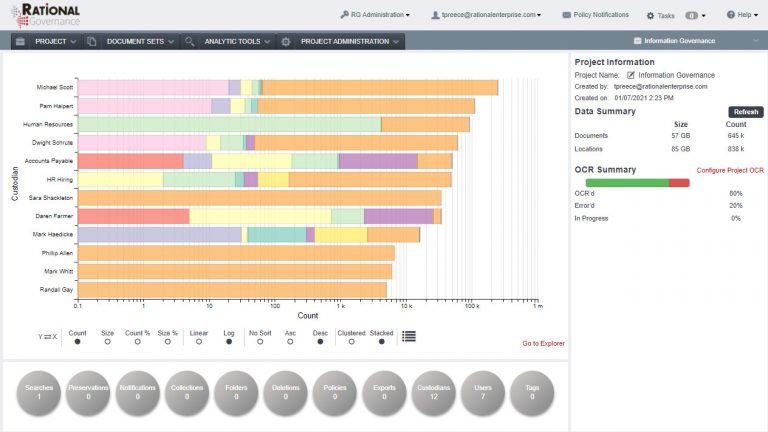
Centralized Data Index
Connect a source repository through an agent, then choose how much detail to index.
- An Initial Data Scan shows the scope and high-level characteristics of the repository.
- Full Ingestion extracts text and metadata into a searchable index while source documents remain in place.
Supported Data Sources
Connect file shares, email systems, collaboration tools, and cloud repositories using source agents:











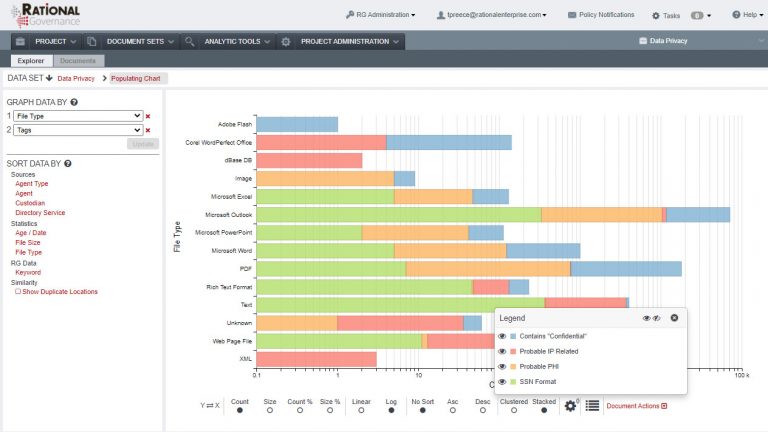
Repository Charts and Filters
Examine data in customizable histograms, then filter the results to investigate a repository or document group. Use the charts to decide which records need classification, preservation, or further review.
Data Identification and Search
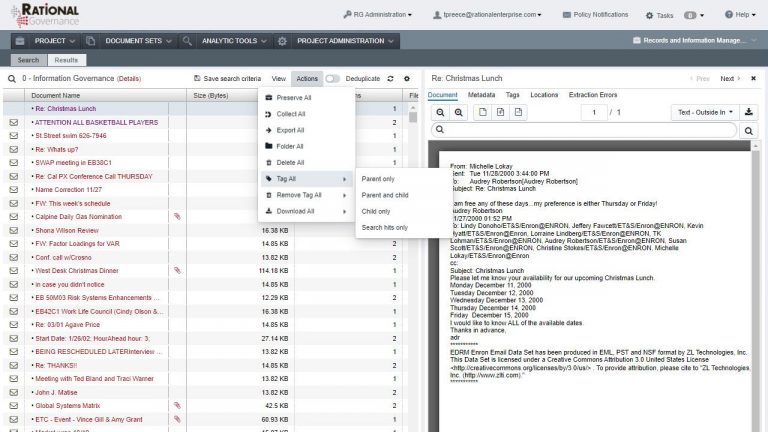
Combine full-text searches with machine learning output, regular expression pattern matching, special text operators, Active Directory integration, and application-specific metadata to identify relevant records. Use statistical sampling and interactive visualizations to check and refine the results before applying an action.
Advanced Analytics
Document Classification Tools
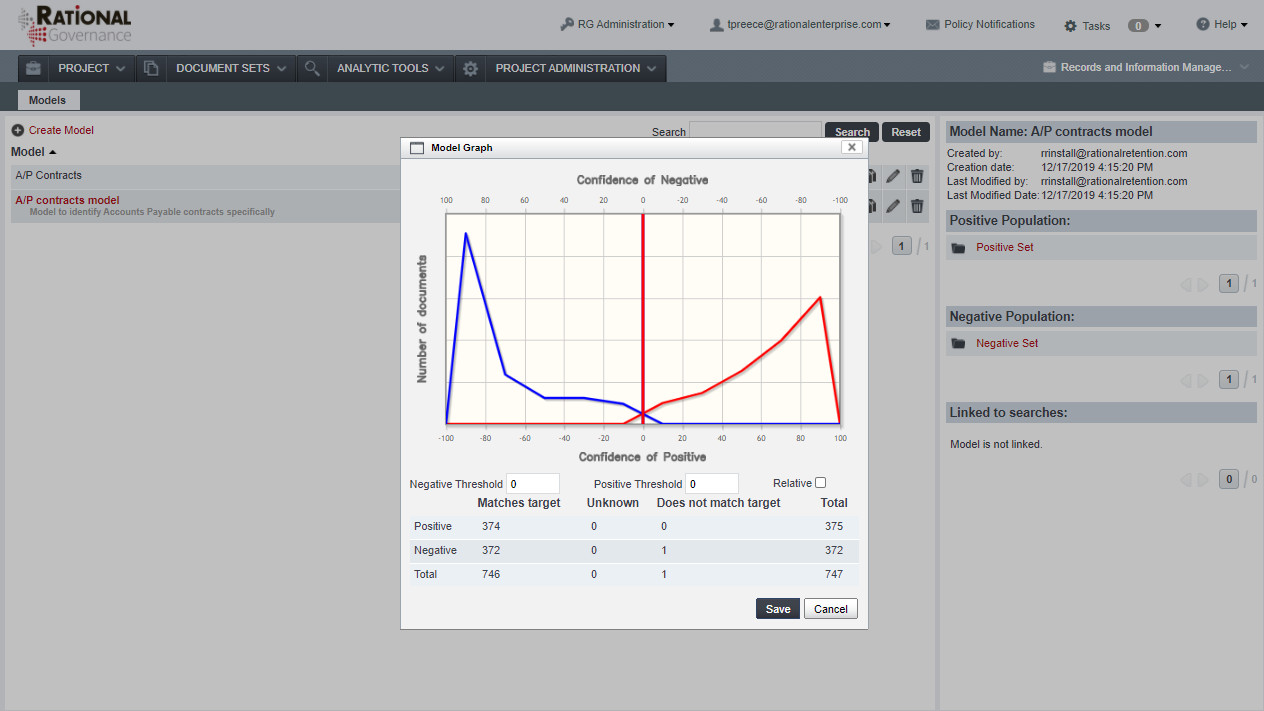
Use machine learning to classify documents by their content and group related material. Examine samples and model results to check how well the classifications fit your records categories.
Supervised Learning (SVM)
Subject matter experts label a sample of documents, then use the support vector machine (SVM) tools to train a classification model. Apply the model to a larger collection and examine the reported accuracy before using the classifications in a policy.
Document Clustering
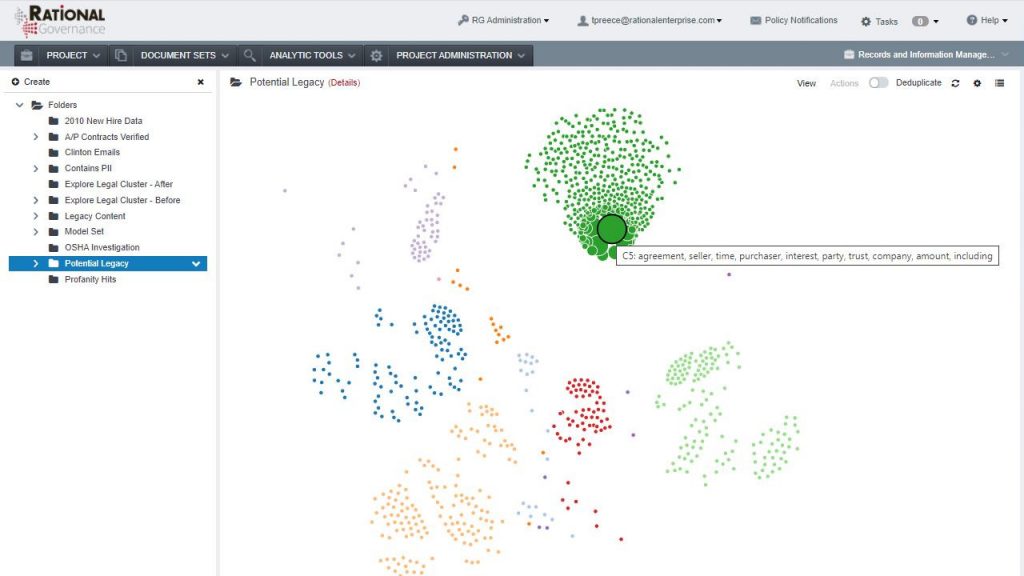
Group documents by similar content without first labeling a training set. Explore the topics within each cluster to identify records categories and material worth examining more closely.
Classification & Policy Engine
Define retention and handling rules for records that match your classifications or search criteria. Configure triggers to preserve, collect, retain, delete, move, or copy those records, and use monitoring and alerts to follow policy activity.

Preserve & Hold

Collect & Export

Retain & Delete

Move & Copy

Monitor & Alert
Repository and Role Permissions
Give approved users access to the repositories and functions required for their role. Permissions determine which records they can examine and which actions they can take.
Audit & Reporting
Review recorded system and user activity, including health checks and policy actions. Use standard reports or configure custom reports, then schedule them for the teams that need the results.
Why Enterprises Choose Rational Governance
In-place Data Management
Search and classify records in their source repositories. Apply policies without creating a separate copy of every document.

Background Indexing
Use source connectors to index content and metadata. Plan indexing around the repositories, permissions, and system resources in your environment.

Work in Existing Repositories
Employees continue using their usual file shares and applications while records teams classify content and apply policies centrally.

Policies for New and Changed Records
Use content and metadata changes to trigger classification and policy actions as new records arrive and existing files change.

Find Sensitive Information
Locate personal information, confidential documents, and other records that need specific handling. Use search criteria and classification to examine the matches.

Prepare for Records Requests
Keep records indexed and apply retention policies before a request or investigation begins. Locate relevant material and preserve it under legal hold when needed.

Storage and Discovery Cost Savings
Reduce the records you store, back up, and collect for discovery by identifying duplicates and material eligible for disposal. In-place search helps teams collect relevant records without copying whole repositories.

Start with a Focused Use Case
Begin with a repository, retention policy, or legal hold requirement. Measure storage reclaimed and staff time saved, then use the results to plan the next phase.
Cost-Effective Information Governance Pricing
Data-volume, user-based, and fixed-fee project options.
Choose a pricing model around the data you need to manage and the work you need to complete. Data-volume licensing includes unlimited users; user-based and fixed-fee project options are also available. Discuss repository sizes, indexing scope, and professional services when comparing costs. Request an information governance quote.

Data-volume-based pricing
License by data volume with unlimited users and employees

User-based pricing models
License by user count when that fits your organization

Fixed-fee & project-based pricing
Scope a defined project without a long-term license

Integration with Rational Review
Collect relevant records from Rational Governance into Rational Review, our separate eDiscovery product. Legal teams can then analyze the collection, review and redact documents, and prepare productions in a Rational Review matter.
Explore Rational Review
Professional Services
Work with a dedicated contact who stays involved from planning through deployment. Our information governance consultants help you define the indexing scope, connect repositories, and configure classification and retention policies around your records processes.
"We have been impressed with the high level of service and professionalism from Rational. The service team has been incredibly responsive, adaptable, and accommodating to our specific requirements."
Deployment, Access Controls, and Data Residency
Deploy Rational Governance behind your firewall or with a cloud provider such as Google Cloud Platform, AWS, or Microsoft Azure. Discuss repository access, hosting responsibilities, and data residency when selecting the environment.
Data is encrypted in transit and at rest. SAML 2.0 and OAuth support single sign-on. For requirements involving HIPAA, SOC 2, ISO 27001, DoD SRG, FISMA, and FedRAMP, confirm the controls and certification or authorization scope for your selected deployment. Review the data handling and contractual requirements that apply to your organization. Request deployment-specific security documentation to assess your requirements.





Our Work in Numbers

30+ TB/Day
Indexing Speed

100%
Customer Retention Over 10 Years

200K+
Custodians Governed
Information Governance Use Cases for Rational Governance
Information Governance Use Cases


See Rational Governance Work with Your Records
Book a DemoFrequently Asked Questions
Data classification, records retention, legal holds, pricing, and deployment