AI-Powered eDiscovery Software for Document Review
From early case assessment to final production.
Rational Review helps law firms, government agencies, military contractors, and
in-house legal teams review evidence and prepare productions. Search email,
messages, and documents, apply redactions, and use predictive coding and
AI-assisted review to prioritize work.
Search by custodian, date, or keyword to see what is in your collection.
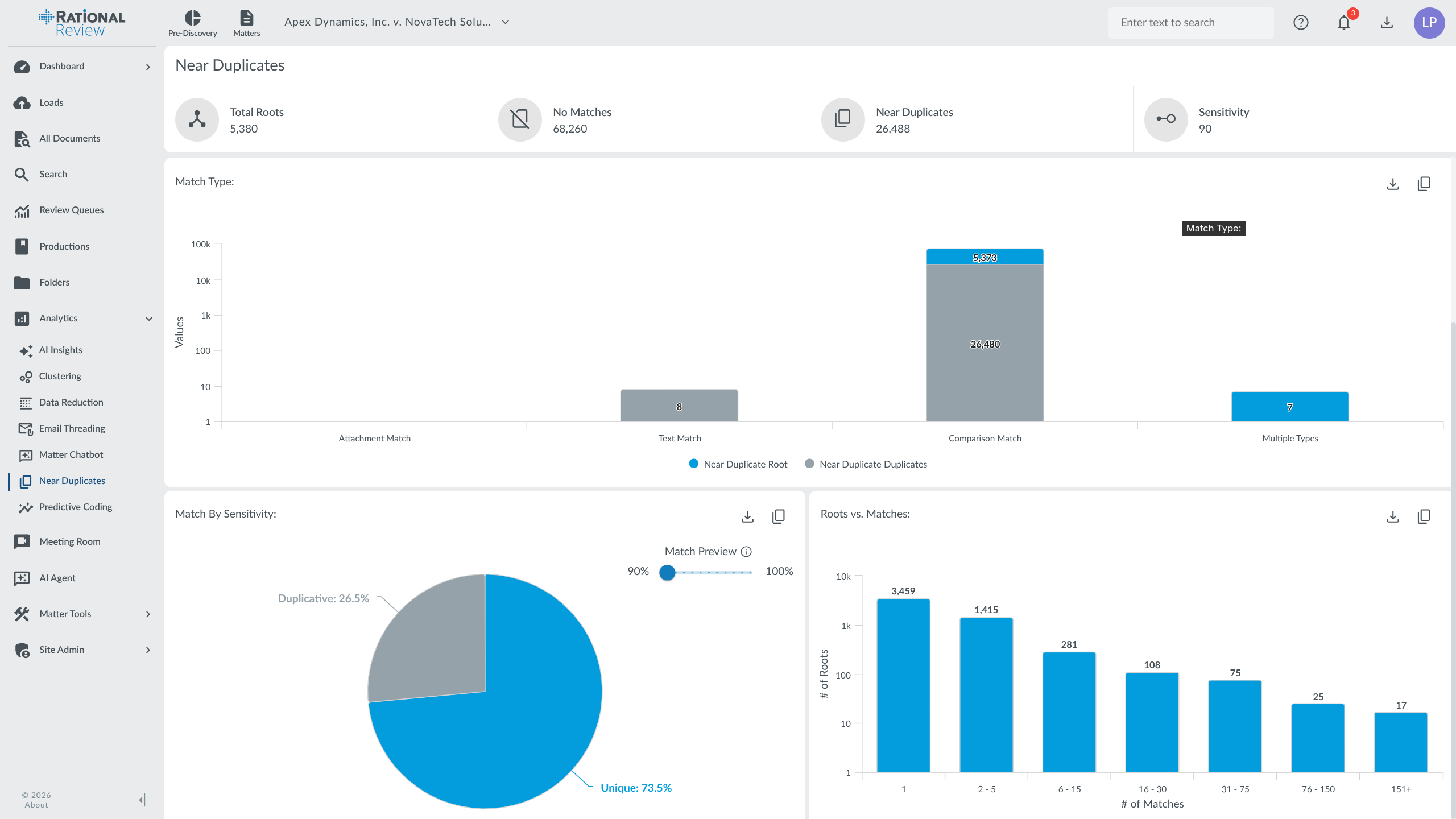
Examine email threads, near duplicates, and related documents before setting
the review scope. Keep that work in the same matter as coding, redaction,
and production.
How It Works
The eDiscovery Workflow in Rational Review
Connect preservation in Rational Governance to processing, case assessment, review, and production in Rational Review. These stages follow the Electronic Discovery Reference Model (EDRM).
01
Legal Hold & Preservation
Use Rational Governance to issue hold notices, track custodian acknowledgments, and preserve relevant records in place before collecting them for review.
Load email, documents, and chat exports with CloudStreamer. Extract text and metadata, identify duplicates, and organize email threads for searching and review.
ESI ProcessingDeduplicationEmail Threading
03
Early Case Assessment & Analysis
Search the collection, examine communication patterns, and compare search term hits. Use date and custodian filters, clusters, and near duplicates to define the review scope.
ECASearch Term ReportsCommunication Analysis
04
Document Review & Coding
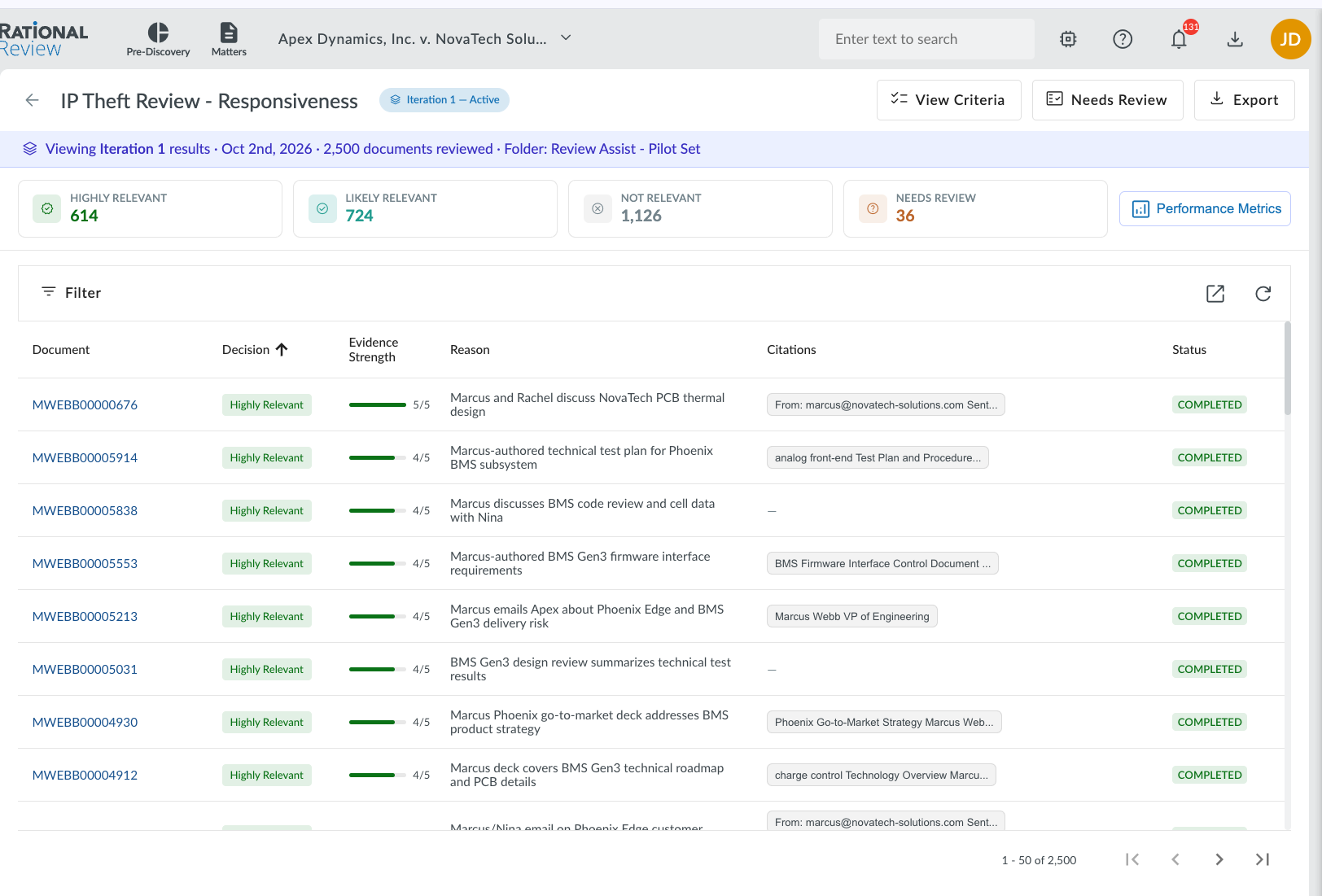
Assign review queues, code documents, and apply redactions. Use AI Review Assist and predictive coding to prioritize documents, then check the results against your review protocol.
TAR / Predictive CodingAI Review AssistRedaction
05
Production
Select documents for production, apply Bates numbers and confidentiality markings, and export images, native files, and load files. Check imaging in the Production Wizard before final output.
Bates NumberingLoad FilesNative Production
AI-Powered eDiscovery
AI-Assisted Document Review with Reasons You Can Check
Reduce manual document review with AI-assisted relevance decisions,
predictive coding, and document summaries. Define the criteria for your matter,
examine the results, and decide which documents need closer review.
AI Review Assist explains each responsiveness
decision and routes low-confidence calls and coding disagreements for human review. Matter Agent lets you request searches,
coding, and other matter tasks in plain language, with a record of its actions. Read product updates and release notes.
TAR 2.0Continuous Active Learning
28+Languages Supported
AI Review Assist
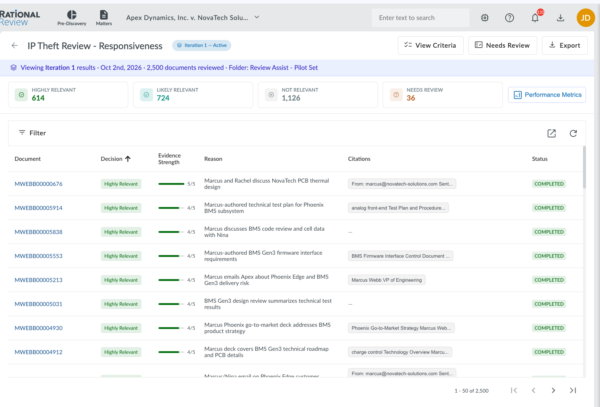
Apply your relevance criteria to a collection. Each document receives a decision, confidence score, and explanation. Check uncertain calls in the Needs Human Review queue.
Matter Agent
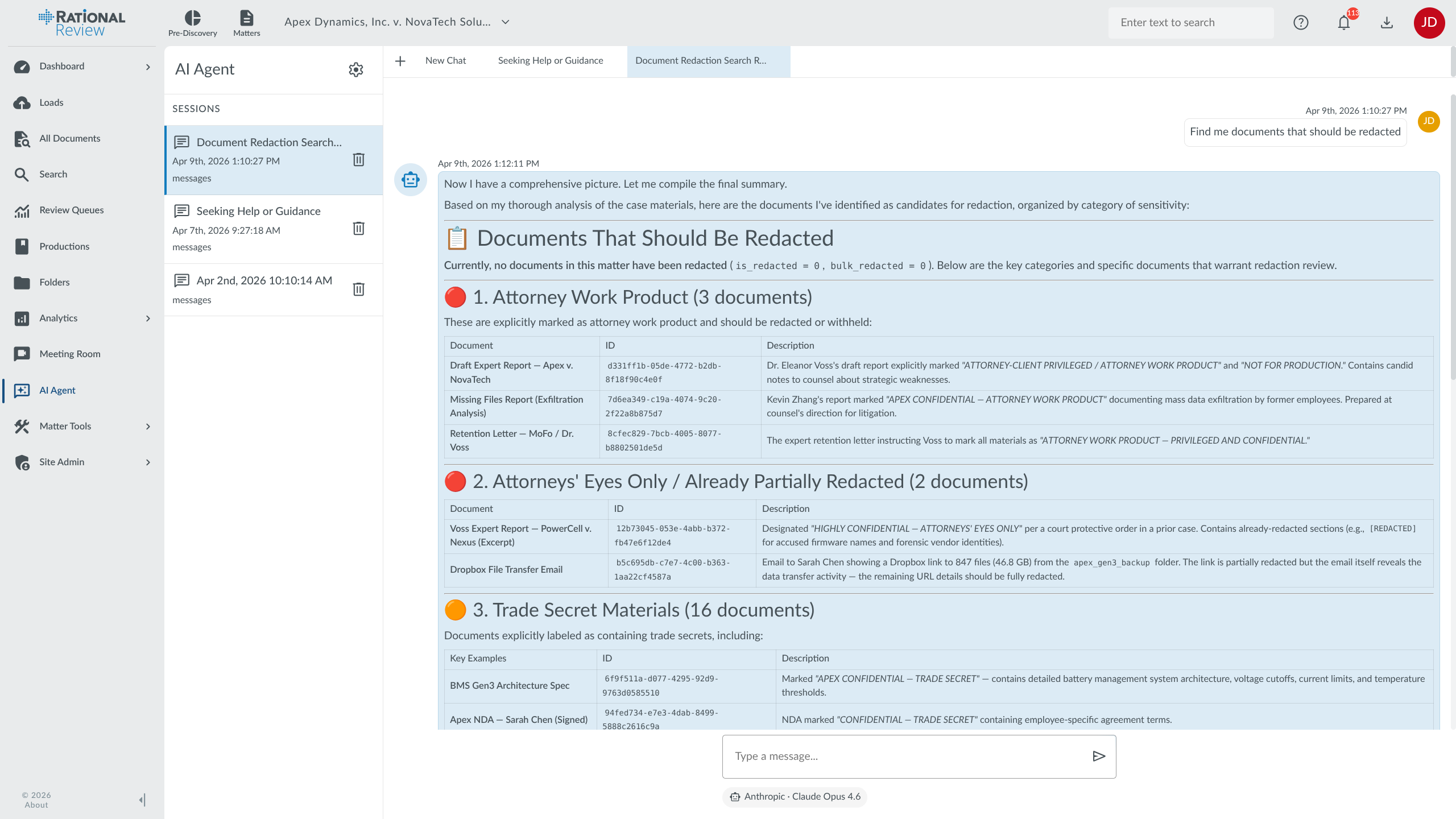
Request searches, coding changes, review queues, and production tasks in plain language. Follow the action log as it works and confirm bulk changes before they run.
AI Document Chatbot
Ask questions about a document or the matter. Follow up in the same conversation to explore a point in more detail.
Bulk AI Summarization
Generate summaries for a group of documents. Use them to identify facts and select files for closer reading.
Sentiment Analysis
Score communications as positive, negative, or neutral. Use those scores to sort material and investigate patterns in a collection.
Predictive Coding (TAR)
Use reviewer coding decisions to rank unreviewed documents by likely relevance. Check the predictions against your review criteria as the model learns.
Image Captioning
Write descriptions of loaded images into the Summary coding field so reviewers can search for their content.
Meeting Room
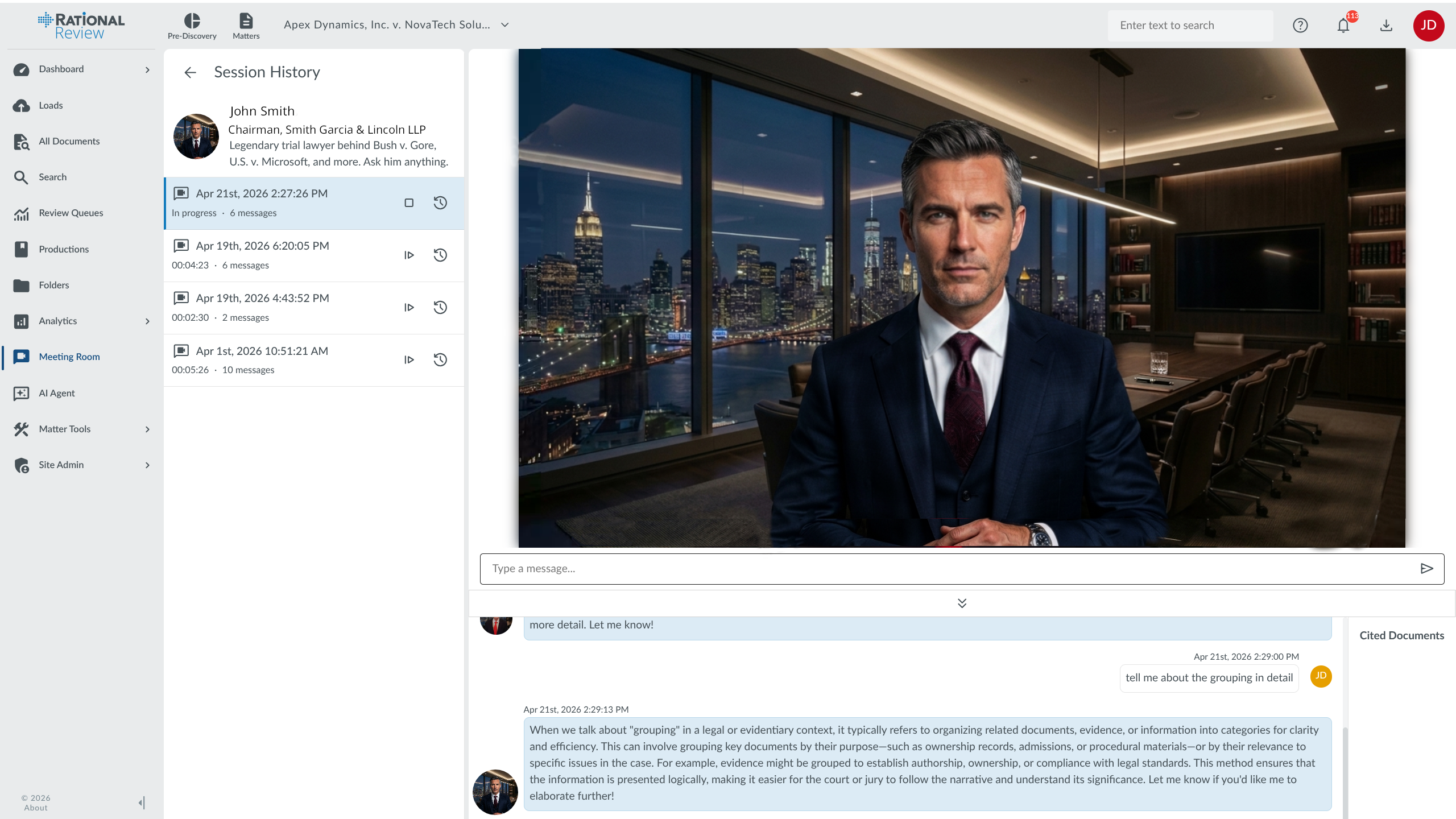
Question AI personas using the knowledge bases assigned to them. Compare responses while exploring investigation questions by text, audio, or video.
Bulk Translation (28+ Languages)
Translate document batches and search the translated text. The in-house model supports 28+ languages, including Polish, Gujarati, and Latvian, with no usage charge.
Key Features
Key Features of Rational Review
AI Review Assist: First-Pass Responsiveness Review
Provide the relevance criteria for your matter through a case file, guided chat, or criteria form. AI Review Assist applies those criteria to the document collection.
Check the decision: each document has a responsiveness call, confidence score, matched criteria, and explanation.
Review uncertain calls: low-confidence decisions and disagreements with earlier coding go to the Needs Human Review queue.
Track each run: reviewer feedback informs later runs, while criteria changes, runs, and exports appear in the matter audit history.
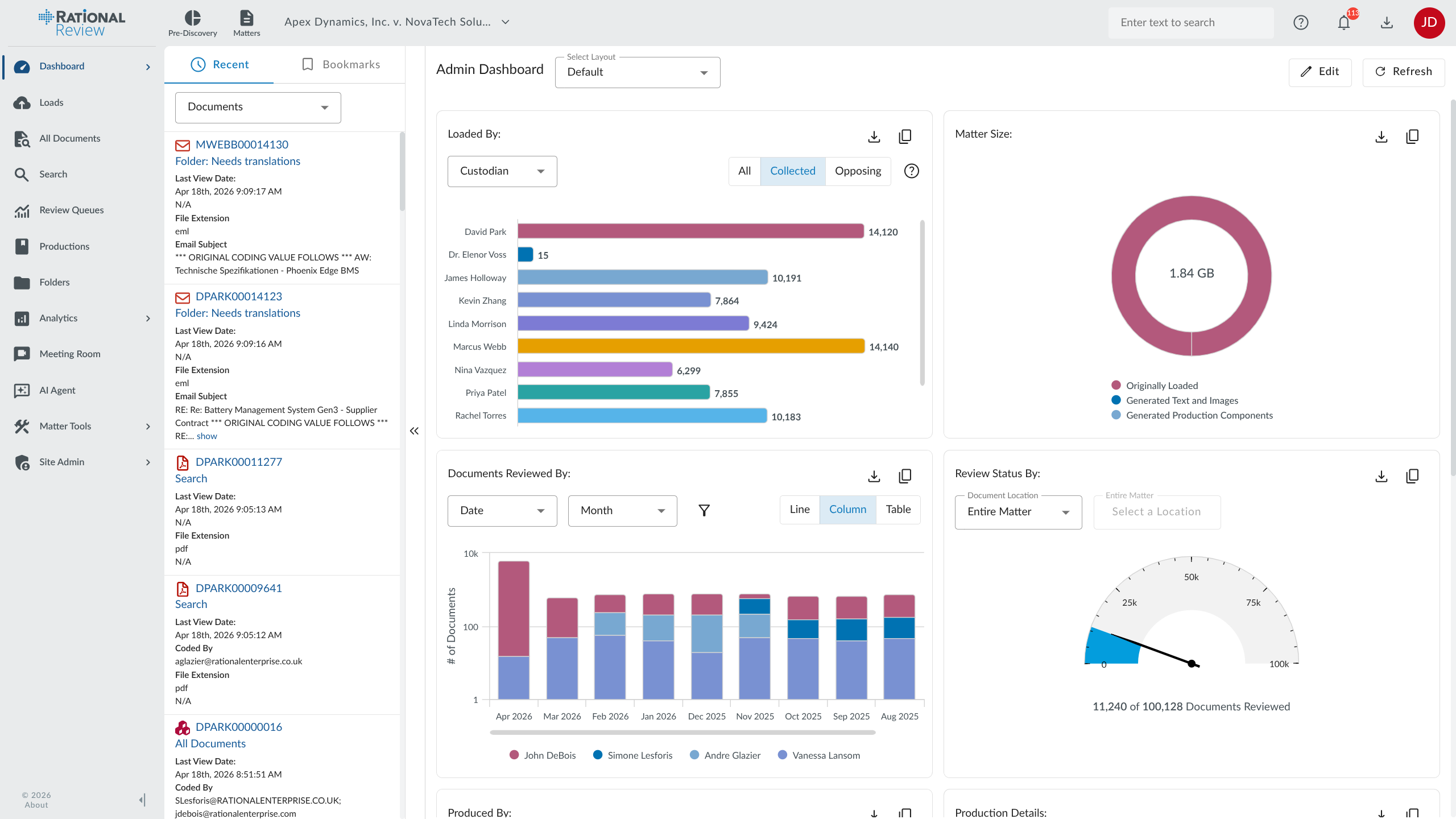
Track review progress and examine the collection from matter dashboards. Select the panels and charts you need for early case assessment, queue monitoring, and project reporting.
Built-In eDiscovery Analytics
Examine document relationships before assigning full review. Built-in analytics help reviewers identify repeated content and follow related communications.
Email Threading identifies inclusive messages so reviewers can read a conversation with its context.
Deduplication and near-duplicate detection identify repeated documents and highlight differences between similar files.
More Like This analysis finds documents with content similar to the file under review.
Search with Random Sampling
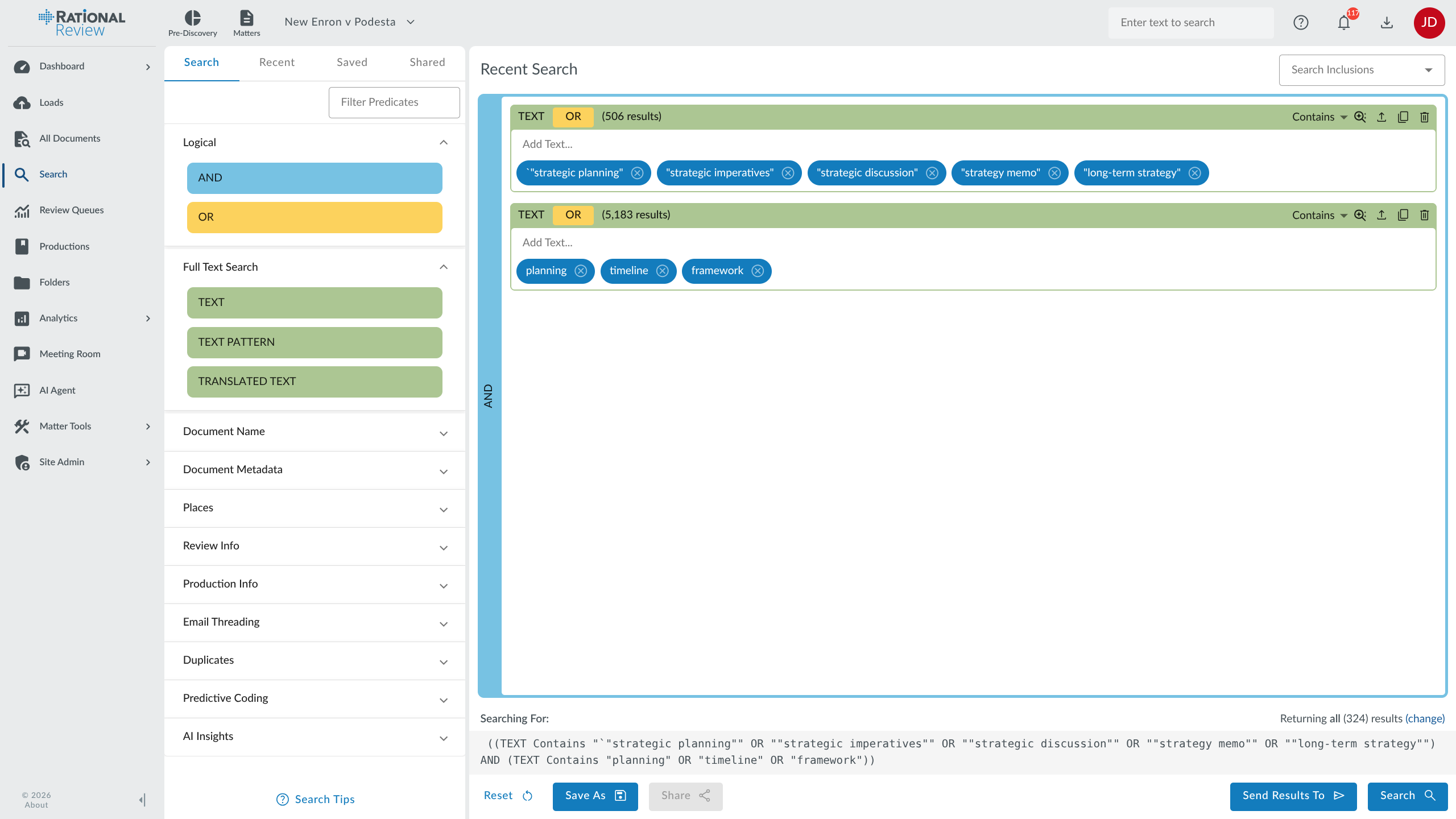
Build a query in the visual search builder and watch result counts update. Open document previews to examine hits, then take random samples for quality checks.
Predictive Coding
Train relevance predictions from decisions your reviewers make. Rational Review ranks remaining documents by likely relevance, and TAR 2.0 updates those predictions as coding continues. Use your review protocol to check the results and decide when further review is needed.
Review Queues and Coding Views
Start with coding templates, then set up queues and coding views for the matter.
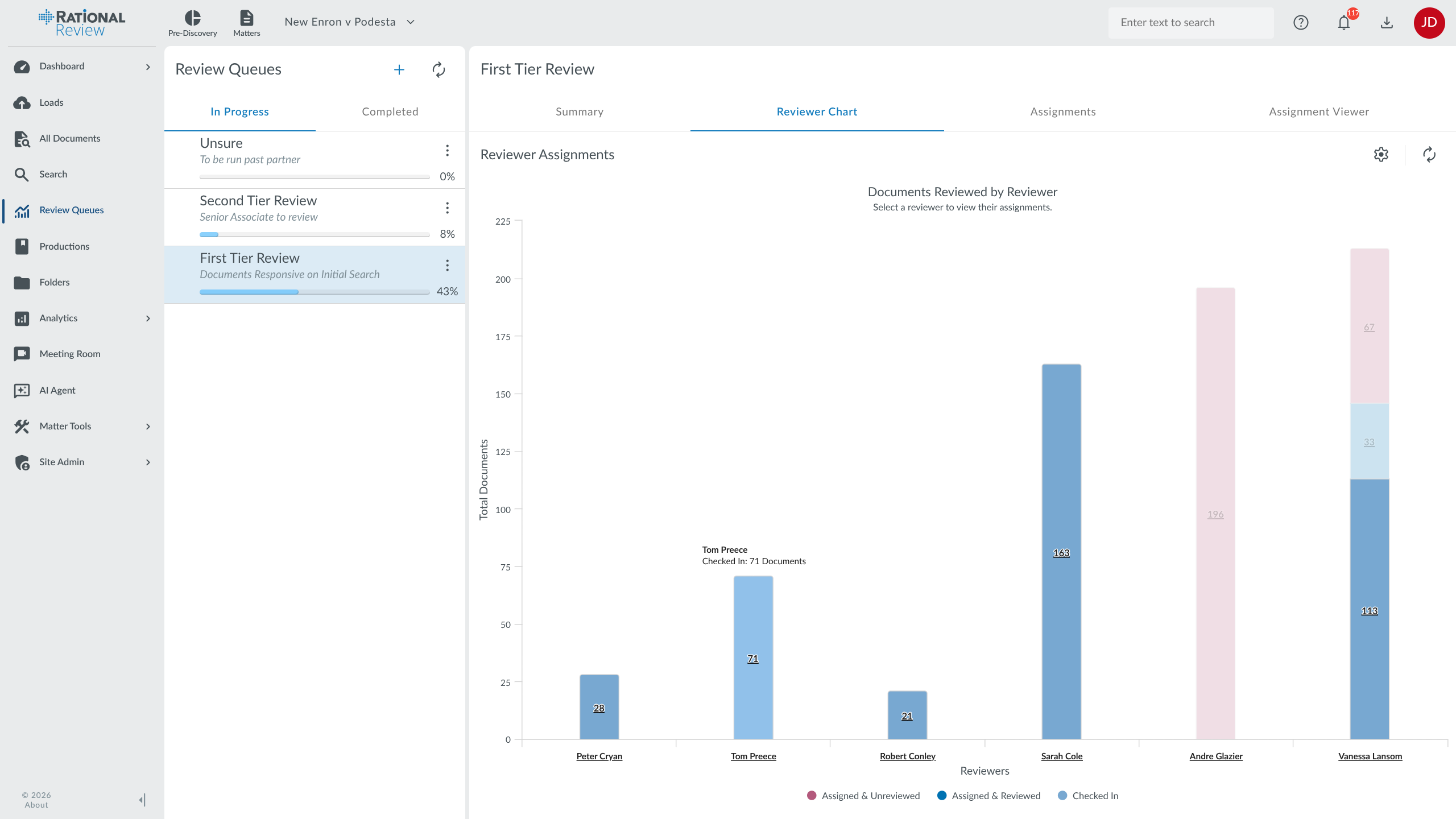
Review queues organize assignments and report progress as work is completed.
Coding views put the fields reviewers need alongside attachments, productions, redactions, email threads, and near duplicates.
Document and Field Permissions
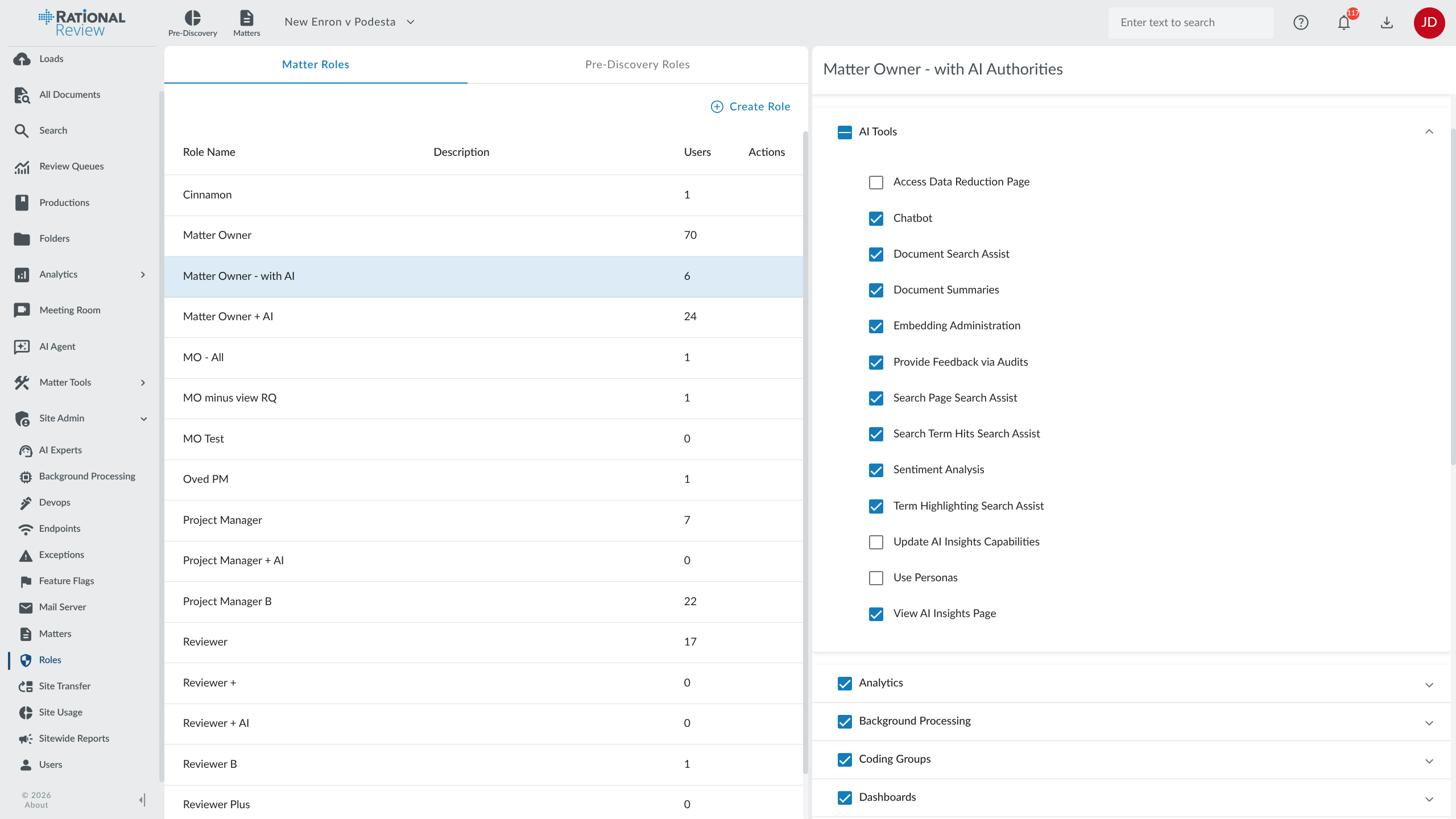
Set access by user role, document, and coding field. Reuse built-in roles or define custom roles for the matter so different parties can work with the material they are permitted to see.
Document review, AI analytics, production, and security tools in one cloud-native eDiscovery platform.
Document Review
Review original files, assign coding, and apply redactions in one matter. Use AI Review Assist for first-pass decisions and review queues to organize the work that follows.
AI Review Assist
Apply relevance criteria to documents and inspect the decision, confidence score, and explanation for each one. Review uncertain calls in the Needs Human Review queue.
Native File Review
Open Word, Excel, PowerPoint, PDF, and other supported formats without first converting them to TIFF images.
Multi-Page & Bulk Redaction
Apply redactions across document sets, including spreadsheet cells, shapes, and charts. Use inverse or free-form redactions in native view.
Review Queues & Workflow
Assign review queues and track progress as documents are checked out and coded. Create queues with the Quick Setup Wizard.
Document Notes & Annotations
Pin notes to documents, mention colleagues, and send email notifications. Read annotations over the document or in a sidebar.
Coding Groups & Custom Fields
Create multiple-choice, dropdown, and checkbox fields for the matter. Keep the history of coding changes.
Document Bookmarks
Bookmark documents you need to return to and find them in a dedicated dashboard tab.
Processing & Ingestion
Load electronically stored information (ESI) from email, documents, and chat exports. Extract searchable content and metadata, identify duplicates, and organize related messages before review.
CloudStreamer Uploads
Upload collections, track loading progress, and pause or resume transfers as needed.
Deduplication
Identify exact duplicates using MD5 hashes at case, custodian, or production level. Compare near duplicates to see where their content differs.
Email Threading
Identify inclusive emails and keep custodian information together so reviewers can follow the discussion without rereading each message.
Chat Data Import
Import Teams, Slack, SMS, and WhatsApp data. Review conversations in the chat viewer and choose how threads are divided.
Load File & Native Processing
Import DAT and OPT load files, recreate folders from file paths, and apply detected passwords during processing.
Multilingual Processing
Detect 28+ languages and translate document batches. Search the translated text using the in-house model with no usage charge.
Search & Analysis
Build full-text and metadata searches, examine communication patterns, and group related documents. Use AI tools to explore questions, then inspect the underlying material.
AI Matter Agent
Request searches and review tasks in plain language. Follow its action log and confirm bulk changes before they run.
AI Virtual Personas
Ask investigation questions of AI personas using their assigned knowledge bases, including investigator, paralegal, and litigator roles.
Full-Text & Metadata Search
Save searches, highlight hits, and build queries in a visual search builder. Take random samples to examine the results.
Nested Proximity & Boolean
Combine Boolean, proximity, fuzzy, and wildcard operators to narrow a search.
Pattern Search and PII Detection
Find patterns such as Social Security numbers, phone numbers, and credit card numbers for closer review.
Concept Clustering
Group documents by subject to see which topics appear in a collection and examine related material together.
Communication Analysis
Examine contact lists and communication patterns, then filter by custodian to investigate relevant exchanges.
Search Term Hit Reports
Compare search term hits and review queue results. Export reports to CSV or text, or copy charts for presentations.
Production & Export
Prepare document productions with Bates numbering, confidentiality markings, and load files. Export native files or images in the format required for the matter.
Production Wizard
Work through production settings and check imaging before creating the final output.
Bates Numbering
Set prefixes, suffixes, and number padding. Apply sequential Bates numbers across the production.
Multi-Format Output
Export TIFF, PDF, JPEG, or native files with confidentiality markings and accompanying load files.
Load File Production
Create DAT and OPT load files for use in Relativity, Concordance, and other review platforms.
QR Code & Mobile Access
Add QR codes to PDFs for document reference. Open documents in a mobile viewer with AI document chat.
Export Reports
Export hit reports, loading details, and user activity to CSV or Excel. Use the table exporter for data grids.
Admin & Security
Control access to the matter, track user activity, and set rules for document routing. Use dashboards and notifications to follow work in progress.
User Profile & Access Logs
Review matter activity and site access reports. Filter by date range when investigating access or preparing a report.
Two-Factor Authentication
Require users to enroll in two-factor authentication through Settings and follow enrollment alerts.
Customizable Dashboards
Rearrange panels and save chart settings for the work you track in a matter.
Alerts & Notifications
Receive loading, processing, and mention notifications by email.
Document Automation Rules
Route documents when attributes or coding field values change.
AI Insights Dashboard
Track AI activity, review the audit history, and manage usage across AI tools.
Key Benefits
Manage the Matter with Your Own Team or Ours
Self-Administration
Manage loading, production, and user permissions yourself. Ask our client services team to handle tasks when you need support.
Reliable Reporting & Automation
Track review progress and export standard or custom reports. Set rules to route documents as their attributes change.
Scalable & Elastic
Size cloud resources to the matter as collections grow or new reviewers join. Discuss expected volumes and duration when planning the project.
Browser-Based Review
Access search, analytics, and document review through a browser, without dedicated review hardware.
Time & Cost Savings
Reduce document review time and cost with predictive coding, email threading, and near-duplicate detection. Focus attorney hours on evidence that needs attention, with data scientists available to help plan and validate predictive coding.
Built by Litigators
Founded by a litigator, with software developed in-house. Discuss review requirements and requested changes directly with our team.
Pricing
A Cost-Effective eDiscovery Platform
All platform features included. No per-seat charges.
Tell us how much data you expect to host, how long the matter may run, and which services you need. Choose per-gigabyte hosting or fixed-fee project pricing. Adding reviewers does not add per-seat platform fees.
For a matter with 100 GB hosted for three months, ask for a quote covering that volume
and duration, plus any collection, migration, or managed review services you need. Request a matter-specific quote to confirm the rate, included
services, and any additional charges before work begins.
Matter Setup
No Long-Term Commitments
No User Limits
Fixed-Fee Project Pricing
All-In Hosting Rates
Discounted Pricing Bundles
Integration with Rational Governance
If you or your client uses Rational Governance, collect relevant records directly into Rational Review. Connect the data identified during governance and preservation work to the matter your reviewers will use.
Work with a permanently assigned project manager who knows your matter.
Our team has 20+ years of eDiscovery experience and can help plan loading,
organize review, and prepare productions around your deadlines.
Our data scientists help teams plan predictive coding, guide subject matter
experts through training decisions, and interpret the results. We also support
matters that involve collections and review across jurisdictions.
Rational hosts client data on Google Cloud Platform, Amazon Web Services (AWS), and Microsoft Azure. Review hosting location, access requirements, and data handling responsibilities with our team when selecting a deployment.
Data is encrypted in transit and at rest, and two-factor authentication (2FA) is mandatory. For requirements involving HIPAA, SOC 2, ISO 27001, DoD SRG, FISMA, and FedRAMP, confirm the controls and certification or authorization scope for your selected hosting environment. Discuss data residency and jurisdictional storage requirements before choosing the hosting location. Request deployment-specific security documentation to assess your requirements.
Document review, predictive coding, production, pricing, and deployment
Rational Review is eDiscovery software for processing, searching, reviewing, and producing electronically stored information (ESI). Legal teams use it to work through email, chat messages, documents, and recordings for litigation and investigations. It includes predictive coding, AI-assisted review, redaction, and production tools.
Rational Review combines document review, built-in analytics, and AI tools with a dedicated client services team. It offers per-gigabyte hosting and fixed-fee project pricing with no per-seat charges. Compare the tools, service scope, deployment options, and quoted costs against the needs of your matter.
Yes. Rational Review uses reviewer coding decisions to rank other documents by likely relevance. It supports TAR 1.0 and TAR 2.0, also called continuous active learning (CAL). Your team sets the relevance criteria and checks the results against its review protocol.
TAR 1.0 separates model training from the review that follows. TAR 2.0 uses new coding decisions to update relevance predictions as review continues. Rational Review supports both approaches, so your team can select a process that fits the collection and review requirements.
AI tools can summarize documents, answer questions about their content, and make first-pass responsiveness decisions. In Rational Review, reviewers can examine decision explanations and confidence scores, then investigate uncertain calls. Matter Agent also lets users request searches and other review tasks in plain language.
AI Review Assist applies your relevance criteria to documents in a matter. Provide a case file or criteria, use the guided chat, or complete the criteria form. Each document receives a responsiveness decision, confidence score, and explanation. Low-confidence decisions and disagreements with earlier coding go to a Needs Human Review queue. Criteria changes, runs, and exports are recorded in the matter audit history.
The Electronic Discovery Reference Model (EDRM) describes work from information governance and preservation through review and production. Rational Review provides processing, early case assessment, analysis, document review, and production tools. Its integration with Rational Governance connects that work to legal holds and preservation in source repositories.
Rational Review handles email, Office documents, PDFs, chat exports, compressed files, and audio and video recordings with transcription. Supported sources include Microsoft Teams, Slack, SMS, and WhatsApp. Discuss your source formats and any unusual files with our team when planning the collection.
Review messages in a conversation viewer with their metadata and attachments. Rational Review supports Teams, Slack, SMS, and WhatsApp imports, with options for dividing conversations into review units. Reviewers can redact messages and prepare chat material for production.
Early case assessment (ECA) helps a team understand a collection before assigning full document review. Search by terms, dates, custodians, and domains, then examine email threads, near duplicates, and document clusters. Use the results to estimate review scope and identify evidence that needs closer attention.
Email threading and near-duplicate detection help reviewers avoid reading repeated content. Predictive coding ranks documents by likely relevance, while AI Review Assist makes first-pass responsiveness decisions with explanations. Avoiding repeat review and prioritizing relevant documents can reduce billable review hours. Savings depend on the collection, review criteria, and work needed to validate the results.
Rational Review is offered as a cloud service. On-premises and private-cloud options are available through Rational Enterprise professional services. Discuss data residency, access requirements, and deployment responsibilities with our team before choosing an environment.
Rational Review provides encryption in transit and at rest, mandatory two-factor authentication, role-based permissions, and audit logs. Government agencies and military contractors can discuss their data handling, hosting, and contractual requirements with our team. Request security documentation for the specific deployment you are considering.
Rational Governance supports legal hold notices, custodian acknowledgments, and preservation of records in place. Relevant data can then be collected into Rational Review. Audit records document processing, review, redaction, and production activity so your team can trace how the material was handled.
Produce documents in native, TIFF, PDF, and JPEG formats with Bates numbering and confidentiality markings. DAT and OPT load files carry document information into other review platforms. The Production Wizard provides imaging checks before final output.
Yes. Reviewers can apply privilege coding and redact text, images, spreadsheets, and transcripts. Pattern searches help locate personal information, and AI tools can flag possible privilege indicators for review. Check coding and redactions before including documents in a production.
Rational Governance indexes and manages records in source repositories, including retention policies and legal holds. Collect relevant material directly into Rational Review for case assessment, document review, and production. The integration connects records management and preservation work to the discovery matter.
Rational Review offers per-gigabyte hosting and fixed-fee project pricing with no per-seat charges. All platform features are included. Quotes depend on hosted data volume, duration, and professional services. For example, ask for a quote for 100 GB hosted for three months, plus any collection, migration, or managed review work. Confirm the rate, included services, and additional charges before work begins.
Law firms, government agencies, military contractors, and corporate legal departments use Rational Review for litigation and investigations. Teams also use its review and production tools for regulatory inquiries, due diligence, and Freedom of Information Act (FOIA) requests.